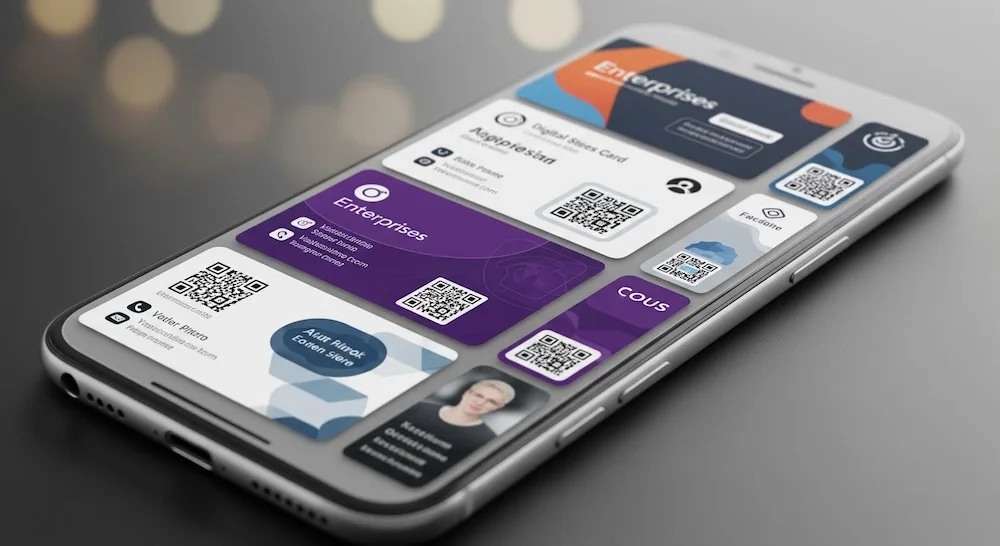
Digital Business Cards for Enterprises: What You Need to Know Before You Invest
Key Takeways
- Enterprises are moving to digital business cards to reduce costs, boost efficiency, and align with sustainability goals.
- Features like instant sharing, CRM integration, and smart contact classification are essential for large teams.
- Security, privacy, and cloud sync capabilities are critical for enterprise adoption.
- Use cases include sales, recruitment, partnerships, and remote team collaboration.
- A smooth rollout involves piloting with core teams, choosing the right platform, and providing training.
Introduction
Business networking is evolving—and so are the tools that support it.
Traditional paper business cards, once a staple of corporate introductions, are now giving way to smarter, digital alternatives that better align with how enterprises operate in a connected, mobile world.
For organisations looking to modernise communication, improve data security, and drive sustainable practices, digital business cards offer a powerful solution.
They’re more than just contact information. They’re a gateway to efficient lead capture, smart collaboration, and centralised contact management.
This guide breaks down what enterprises should know before adopting digital business cards—from the features that matter most to key use cases and rollout strategies.
Why Enterprises Are Switching to Digital Business Cards?
As businesses scale and modernise, traditional business cards are quickly giving way to digital alternatives that offer greater flexibility, traceability, and long-term value.
- Lower Costs, Less Waste: Printing thousands of business cards annually adds up in both expense and environmental impact. Digital cards eliminate printing costs and align with paperless sustainability goals.
- Always Up-to-Date: Whether an employee changes role, phone number, or office location—digital cards update in real-time, avoiding outdated contact info circulating among clients and partners.
- Faster, Smarter Networking: At trade shows, roadshows, or virtual events, digital business cards allow instant sharing and retrieval of contact details—reducing manual entry and lost opportunities.
- Remote-Friendly and Borderless: For distributed teams and global enterprises, digital cards work across time zones, devices, and languages—streamlining professional introductions anywhere.
- Supports ESG and Digital Transformation Goals: Moving to digital business cards contributes to broader ESG initiatives, reducing physical waste while modernising operations in line with enterprise digitalisation strategies.
What Are The Key Features Enterprises Should Look For In A Digital Business Card?
Not all digital business card solutions are created equal. For enterprise adoption, it’s essential to look beyond basic contact-sharing and focus on tools that offer scalability, security, and smart automation.
Instant Sharing & Smart Scanning
- QR code or NFC tap-to-share functionalities for frictionless exchange.
- Batch scanning to capture multiple contacts at events or expos.
- Seamless input into CRMs or contact databases with minimal manual effort.
Contact Management & Classification
- Intelligent tagging and categorisation by role, industry, or location.
- Searchable databases for quick retrieval of contacts across teams.
- Integration with calendar tools, email platforms, and sales workflows.
Privacy, Permissions & Security
- Full control over when and how contact details are shared.
- Role-based access control to restrict usage by team or department.
- Data encryption, secure backups, and compliance with privacy regulations.
Cloud Sync & Team Collaboration
- Cross-device syncing so contacts stay updated everywhere.
- Admin dashboards to monitor usage and adoption across teams.
- Insights into card shares, lead quality, and contact conversion metrics.
Enterprise Use Cases: Where Digital Cards Make an Impact
Digital business cards are more than just a paperless alternative—they’re tools that enable faster, smarter networking across functions. Here’s where they create real value for enterprise teams:
- Sales & Marketing Teams: At trade shows, client visits, or roadshows, sales reps can share their cards instantly, collect leads efficiently, and auto-log them into CRMs for faster follow-ups.
- HR & Recruitment: Recruiters engaging with candidates at career fairs or industry events can use digital cards to streamline contact exchange and maintain candidate databases securely.
- Executive & Leadership Networking: C-level executives meeting partners, clients, or investors can ensure their contact details are always accurate, updated, and professionally presented with dynamic QR cards.
- Cross-Border & Remote Teams: Teams working across time zones or regions benefit from real-time syncing and easy contact sharing, improving onboarding, collaboration, and client engagement.
Common Challenges to Address Before Investing
While digital business cards offer significant benefits, enterprises should anticipate and address a few common hurdles during adoption:
- Resistance to Change: Employees accustomed to printed cards may hesitate to adopt digital alternatives, especially across traditional departments.
- Device Compatibility Issues: Ensuring the digital card platform works smoothly across all employee devices (iOS, Android, desktop) is essential to avoid rollout delays.
- CRM and System Integration: Enterprises need to check how well the solution integrates with their current CRM, HR, or lead management systems to avoid manual entry duplication.
- Privacy and Data Compliance Concerns: It’s important to clarify how personal data is stored, shared, and protected, especially in regions with strict data protection regulations like GDPR or PDPA.
How to Successfully Roll Out Digital Business Cards Across Your Organisation
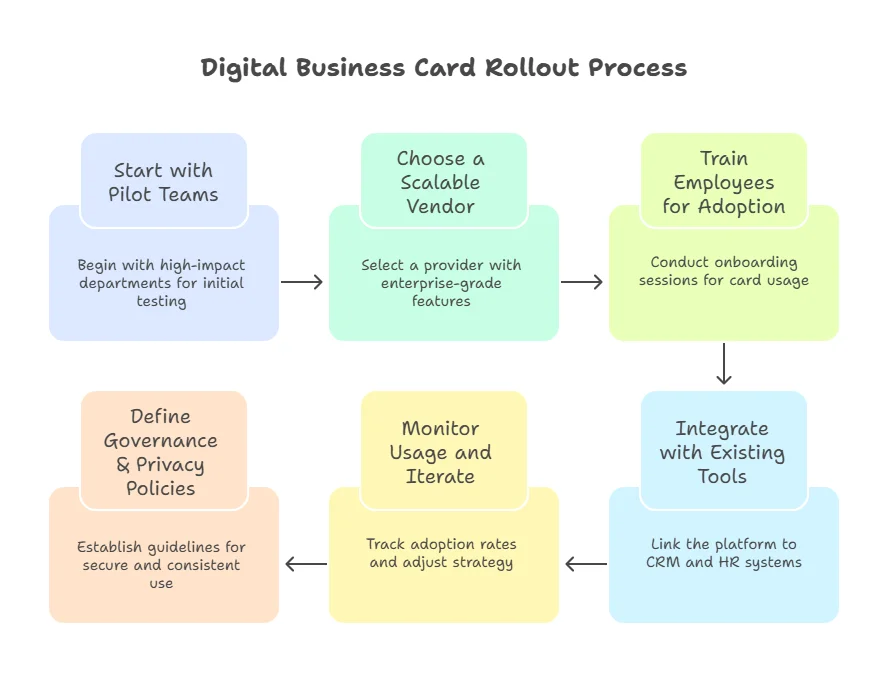
A smooth enterprise-wide rollout of digital business cards requires thoughtful planning and phased execution. Here are key steps to ensure successful adoption:
- Start with Pilot Teams: Roll out the solution to high-impact departments like sales or marketing to test usability and gather initial feedback.
- Choose a Scalable Vendor: Select a provider that offers enterprise-grade security, admin controls, analytics, and integration options suitable for your organisation’s size and needs.
- Train Employees for Adoption: Conduct onboarding sessions to guide teams on using the cards, updating information, and managing privacy settings.
- Integrate with Existing Tools: Link the platform to your CRM, HR systems, or contact databases for seamless data sync and automation.
- Monitor Usage and Iterate: Track adoption rates, collect user feedback, and adjust your rollout strategy before scaling to all departments.
- Define Governance & Privacy Policies: Establish internal guidelines for usage, data permissions, and role-based access to ensure secure and consistent use across teams.
What Makes Net7 (by Mandrill) Enterprise-Ready?
While there are many digital business card platforms available, few are designed with the needs of fast-moving enterprise teams in mind.
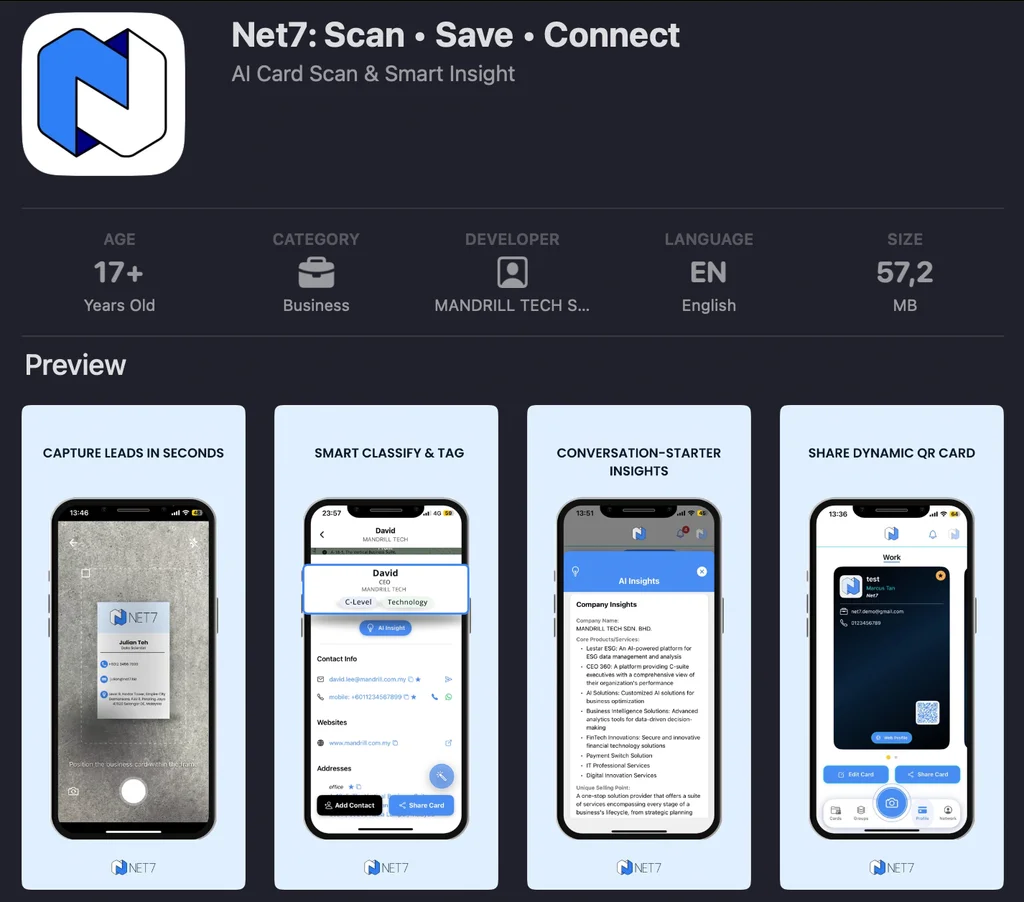
Net7 stands out with features purpose-built for performance, privacy, and scale:
- Built for Fast-Paced Teams: Net7 makes it easy to scan and save multiple cards at once, capture leads in seconds, and classify contacts instantly based on role or industry.
- Dynamic QR Cards That Stay Updated: With Net7, your business card never goes out of date. Users can update details in real time, and recipients always see the latest information via a single QR code.
- Privacy and Sharing Controls: Share only when you want to. Net7 includes features like private-by-choice access, allowing users full control over who sees their information and when.
- Smart Collaboration & Team Features: From syncing contacts across devices to tracking team-wide activity and engagement, Net7 supports large teams with centralised admin control and cloud backup.
- Cloud Sync and Backup: Not only can you scan multiple cards at once, but your contacts get saved instantly. All your contacts can now auto-sync across devices with secure cloud backup.
Explore Net7’s Features or Request a Demo
Conclusion
Digital business cards are more than a paperless alternative — they’re a gateway to smarter, faster, and more secure networking for modern enterprises. By embracing this shift, companies can cut costs, reduce environmental impact, and empower their teams with tools that elevate every interaction.
Choosing the right platform matters. Look for one that goes beyond basic contact sharing to offer real-time syncing, enterprise-grade security, and meaningful analytics.Ready to upgrade your business networking? Explore Net7, a digital business card solution built by Mandrill for enterprise needs — or contact us to get started.